Skip the blank canvas.Start with structure.



Try it free

Shortcut-first workflow. No credit card required.
Built For Speed
Stop wasting hours figuring out layout.
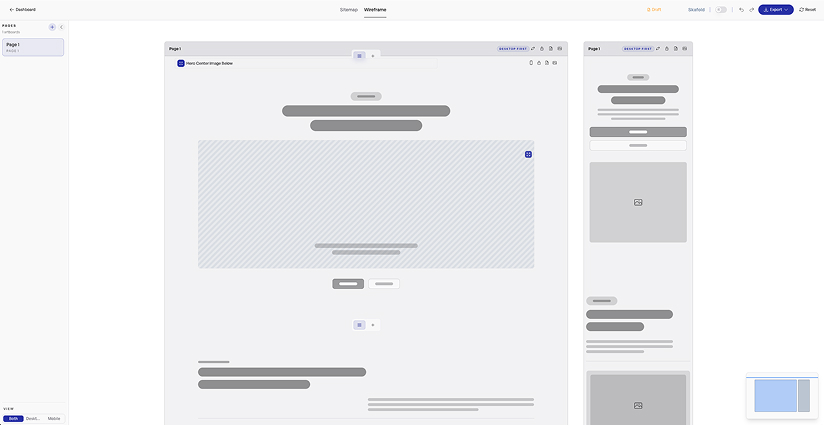
Quick add, smart controls, and a builder built for speed. Plan fast, refine, then move to Figma or give AI the structure it needs — all in a click.
Add, tweak, and reposition — instantly.
Add, remove, and adjust layouts quickly with controls built for speed. Use quick add and keyboard shortcuts to stay in flow and make changes without slowing down.

Hero - Image RightHero
Two columns with copy first and media second

Hero - CenteredHero
Centered hero with constrained copy and dual CTA row

Feature - Three ColumnFeatures
Three content columns for feature highlights

Feature - Icon GridFeatures
Three columns with icon, title, and copy

Content - Two ColumnContent
Editorial two-column content layout with inline imagery

Blog ArchiveContent
Editorial archive layout for blog posts with a card grid

Product Detail - StandardEcommerce
Standard ecommerce product detail layout with gallery, pricing, and add-to-cart controls
Start with structure. Change it anytime.
Start from structured layouts, then adjust and reshape as you go. Switch direction quickly without rebuilding or getting stuck in rigid presets.
Make changes without thinking.
Adjust layouts instantly using simple keyboard shortcuts — no panels, no digging, no slowdown.
AI Handoff
Windsurf
Stitch
Codex
Claude Code
Cursor
Lovable
VS Code
Figma Make
JetBrains
Bolt
Replit
v0
Cline
Framer
Gemini
Perplexity
OpenAI
Design AI
Reduce AI guesswork and wasted tokens.
Export structured layouts with screenshots and content so AI tools have real context. Give AI real structure so it stops making things up — and you stop rewriting prompts.
Skafold Import
Paste wireframe data from Skafold
Cmd+V to paste
Data Preview
Pages4
Sections16
Creating frames...
Stop rebuilding layouts in Figma.
Export your structure and start designing immediately — no redraw, no wasted time, no duplicated work.
Add Project
Unlimited projects, one plan
6
Stop paying per project.
Create as much as you want — no credits, no limits. Save that for your AI tools.
Map your site in minutes.
Turn messy ideas into a clear plan. Map your pages and flows visually so you can see the whole site before you start designing or building.
Speed details that compound.
Infinite Canvas
Keep exploring ideas without hitting layout limits.
Auto-save
Every edit is saved automatically while you stay in flow.
Quick Add
Open the searchable add menu with Cmd/Ctrl+E and keep building.
Quick Keys
Use keyboard shortcuts to cycle settings without leaving the canvas.
Padding Controls
Dial in column and container spacing faster as layout takes shape.
Hover Editing
Surface quick edit controls on hover so common changes take fewer clicks.
Simple Pricing
One Plan.
Zero Friction.
Unlimited projects, exports, and faster planning in one simple plan. Predictable pricing. No hidden fees. Cancel anytime.
Start here
7-Day Free Trial
Full access. No credit card. Cancel anytime.
$0
Starter - Monthly
Start with structure. Move straight into design or build.
$9.95
Most Popular
Starter - Annual
Everything in Starter, with uninterrupted access to plan, design, and build all year - with 2 free months.
$99.50
All prices are in USD — Local Taxes Apply
About
Built To Keep You In Flow
Skafold helps you go from idea to plan to production faster, with a canvas workflow built around shortcuts, muscle memory, and low-friction editing.

David Waters
Product builder & educator
Why Skafold exists
Most planning tools force too much mode switching: select something, open a panel, hunt for controls, repeat. Skafold keeps the canvas central so structure can evolve while the idea is still fresh.
This release pushes that further with quick add, quick keys, faster padding control, and cleaner interactions that make wireframing feel closer to sketching. The goal is simple: less UI overhead, faster decisions, and a cleaner handoff to Figma, AI, or code.
Speed without chaos
Shortcut-first controls keep editing fast while the structure stays clear.
Idea to production
Start with a rough direction and move into Figma, AI tools, or build workflows from the same canvas.
Less mode switching
More of the workflow now happens where you are working instead of in detached panels.
Built for real work
Made for freelancers and teams building websites under real timelines.